
Trillet AI Integrations
Trillet AI offers seamless integration with popular automation tools like Make.com, n8n, and our Web SDK, allowing you to automate outbound AI voice calls and embed AI agents directly into your applications. Use these platforms and tools to trigger TrilletAI’s call capabilities directly from your workflows or integrate voice agents into your websites.Make.com Integration

Installation
To add TrilletAI’s app to your Make.com organization: You can find TrilletAI directly on Make.com by searching “TrilletAI” in the App list under theus1 or us2 regions.
If TrilletAI does not appear in your region or account, use the invitation link below to add it manually:
🔗 Click here to install if it doesn’t appear.
n8n Integration

Installation Steps
- Ensure
n8nis installed on your machine. If not, follow n8n installation guide. - Open your terminal and install the TrilletAI node package:
SDK Integration
Installation
You can install the SDK via npm for modern web frameworks (e.g., React, Next.js) or load it directly from a CDN for simple HTML integrations.Via npm
- Install the package:
- Import and use in your code:
Via CDN (No Build Tools Required)
Include the SDK script in your HTML:Configuration
Initialize aTrilletAgent instance:
Usage
- Start a Call:
- Use
startPublicCall()for public (workspace-based) integrations. - Use
startCall()for API key authenticated calls.
- Use
- End a Call:
- Toggle Microphone:
- Event Handling:
The SDK extends
EventEmitter. Listen for events likeconnected,disconnected,error,assistantStartedSpeaking, etc.
- Transcripts: Access real-time and final transcripts:
SDK Integration Preview
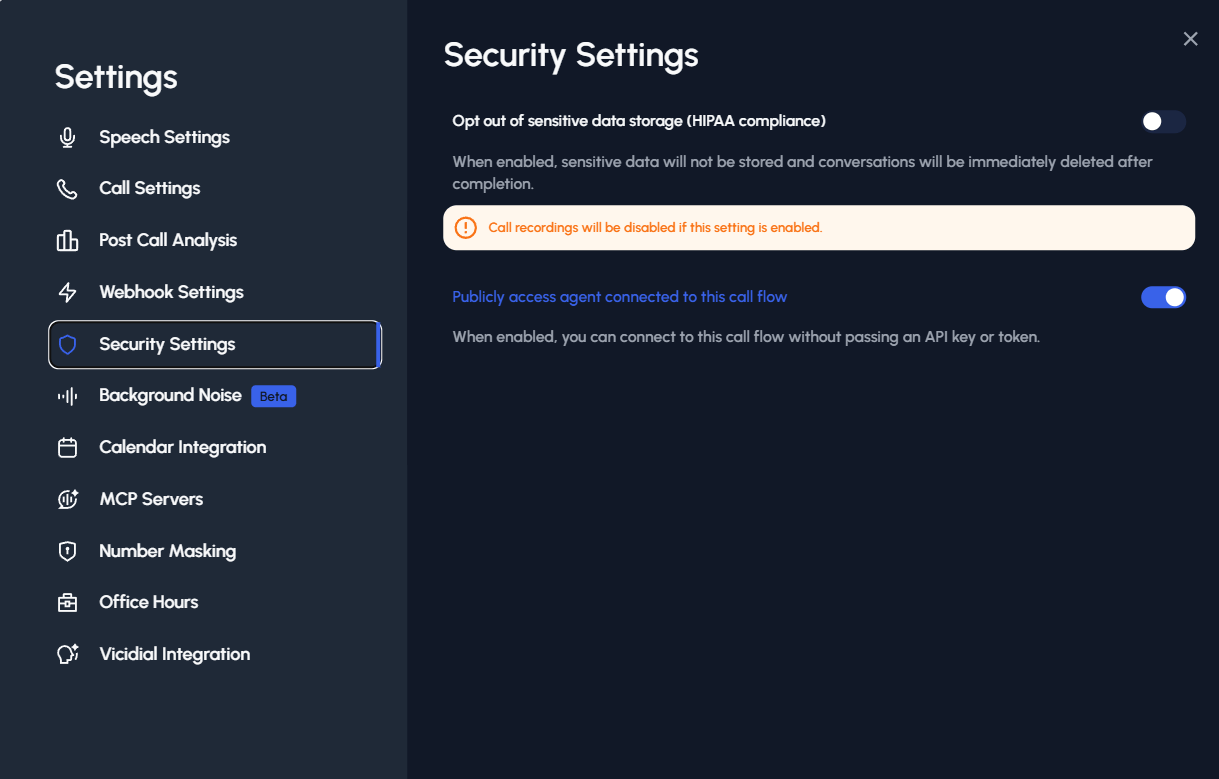
Important: Make sure to enable public access in your call flow settings before testing the SDK integration. You can find this option in the call flow settings panel.
Examples
React Component Integration
For React/Next.js apps, create a basic component to handle calls:Simple HTML Button Integration
Embed a button that starts/stops a voice call with your agent:your-workspace-id and your-agent-id with your actual Trillet AI credentials. For production, secure sensitive data (e.g., avoid exposing API keys client-side). The SDK handles browser compatibility checks internally. If you encounter issues, ensure microphone permissions are granted and test in a secure context.